Every day we save countless photos, videos, songs, documents and other files on our computers and smartphones. We open them within seconds when we need them, and delete the ones we no longer want. But have you ever wondered where this data actually lives, and in what form? How does a computer keep a photo, a song or a piece of writing? And how does the data stay intact after the power goes off?
The answers lie in digital storage technology. From the traditional hard disk drive (HDD) to the modern solid state drive (SSD), each technology stores data in its own way. Here is how they work.
How an HDD stores data
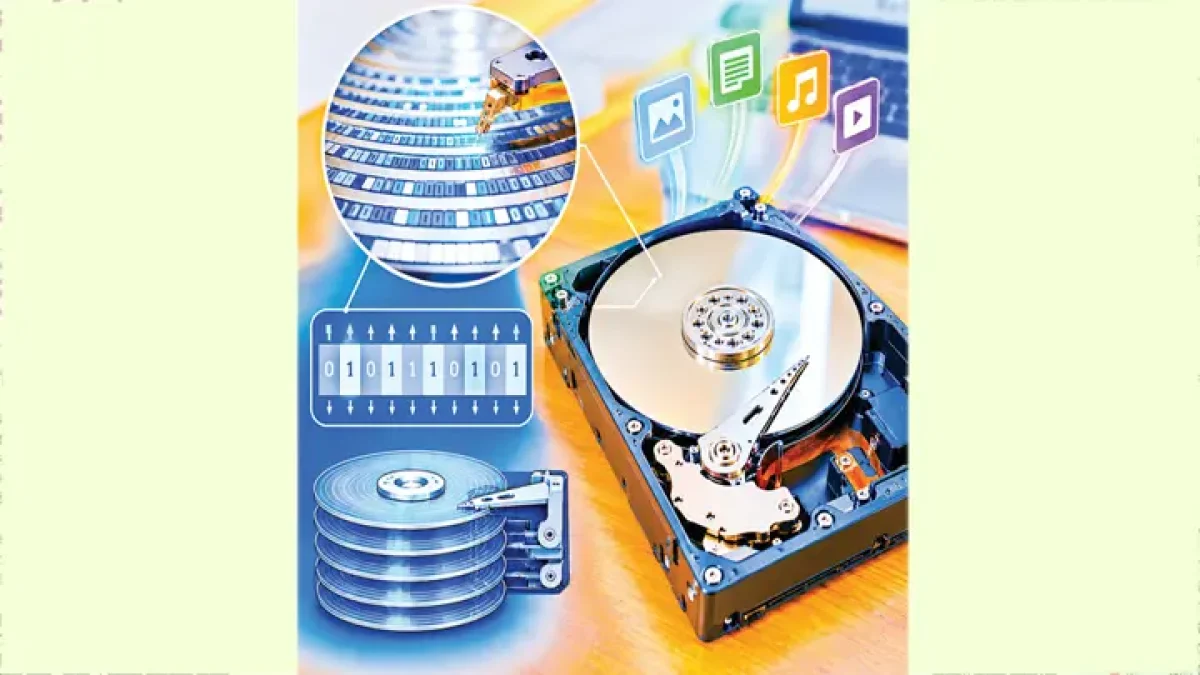
HDD stands for hard disk drive. It is an electromechanical storage device, which means that besides electronic circuits it has spinning and moving parts. Inside a hard disk are one or more round disks called platters. Their surfaces carry a thin layer of special magnetic material. The platters spin at high speed, and data is written and read by a tiny part called the read-write head. When you tell the computer to save a file, the operating system and the drive’s controller prepare the data in a suitable digital format. The write head then creates a specific pattern on the magnetic surface of the platter. Data is represented by changing the properties of magnetic regions in this way. The drive’s electronics and control system decide which data is written where. When a file is opened, the read head detects the magnetic signal at the relevant location. The drive’s electronics convert that signal into digital data and send it to the computer. The operating system and the software involved then show the data as a picture, text, video or another usable form. Because the platters in an HDD spin and the head has to move to a specific spot, finding and reading data takes some mechanical time. This is why an HDD is slower than an SSD in many situations.
How an SSD stores data
SSD stands for solid state drive. Unlike a traditional HDD, it has no spinning platters or moving read-write heads. As a result it reads data quickly, makes less noise, and has no moving parts that can be damaged by a knock. Most SSDs today use NAND flash memory. The cells of this memory change their electrical properties under the influence of electric charge, and data is read by detecting that change.
Memory cells
A NAND flash memory cell is usually built on a transistor-based structure. Depending on its design, electric charge can be held in a floating-gate or charge-trap region. That charge affects certain electrical properties of the cell. The SSD’s controller chip measures these properties to work out what data is stored. When data is written, the state of charge in the cell is changed in a controlled way. Depending on the design of the NAND flash, various physical processes, including quantum tunnelling, may be used to move the charge; not all flash memory has the same internal structure.
What happens when you delete a file
When you delete a file from a computer or phone, its data is not always wiped from storage straight away. Usually the file system first marks the space the file occupied as available to be reused.
Why drives fail
No storage device lasts forever, but HDDs and SSDs have different limits. An HDD has mechanical parts such as a motor, platters and read-write heads. A knock, too much heat, mechanical wear or an electronic fault can damage the drive. Signs such as unusual noises from the drive, repeated trouble reading files, or the computer not recognising the drive are a warning. In an SSD, the NAND flash cells can only be written and erased a limited number of times. Repeated program-erase cycles can wear the cells down over time. Faults can also develop in the controller chip, the power supply or other electronic parts. How long an HDD or SSD lasts depends on the quality of the drive, how it is used, the temperature, how much data is written to it and other conditions.
Besides HDDs and SSDs, other technologies are used to store data. Optical discs such as CDs and DVDs are read with a laser. Magnetic tape is used to store large amounts of data for the long term and for backups. Memory cards and USB flash drives also use NAND flash technology. Cloud storage does not keep data in some magical invisible place either. The service usually runs on servers, storage drives, networks and management software in remote data centres, and users can view, upload or download the data they are allowed to reach over the internet.
HDD or SSD?
Both have their own advantages. In general an HDD offers more capacity for less money, so it is still useful for storing large files, archives or backups. An SSD, on the other hand, means faster start-up, faster file opening and faster launching of software. With no moving parts, it is also less at risk from physical knocks. Which one to choose depends on the user’s budget, the capacity needed, the performance required and how the computer is used. In many cases an effective solution is an SSD for the operating system and everyday software, and an HDD for large files and backups.
বাংলায় মূল প্রতিবেদন পড়ুন · Read the original Bengali report